

Databricks Adoption/Migration Guide
Building a Lake House Platform

So, you want to join the cool kids on the block and don't know where to start? Do you have stars in your eyes and think adopting Databricks as a Data Platform is the cure-all for the data woes and problems you have today?
Maybe. Yes, and no.
Today, we are going to walk through a step-by-step guide to migrating to or adopting Databricks as your primary data platform.
- Where do you start?
- What are the gotchas?
- How long will it take?
- What are the steps?
- What does success with Databricks look like?
I got you covered. Let's do this.
The Uncomfortable Truth
We need to discuss something that may be slightly uncomfortable. There is a chance you might squirm in your seat and get a little bit of perspiration building up under that collar. Like walking past your crush in the middle school hallway at school.
Yes, a new shiny data platform like Databricks can cover a multitude of sins. But it can't give you complete absolution from all the junk you've swept under the rug. Don’t be a Data Catholic; grace doesn’t flow freely from the hands of the data saints on high. The pea can be moved, but the pea under the cover will still exist.
Practically, what do I mean? Example …
If you don't have a development environment now and don't have one in your new Databricks environment, you might still run into issues.
Fundamentals, my friend. You simply cannot ignore the fundamentals when migrating or adopting Databricks as a core data platform. We must accept that, even in the Age of AI, core principles should be applied at both the conceptual and architectural levels of ANY data platform, including Databricks.
Is Databricks the premier data platform, offering never-before-seen capabilities and integrations that make running a Lake House at scale a pleasure? Indeed. Can you do things to make your life easier and reduce heartburn and DBU burn? Indeed.
So, how does one migrate to Databricks? One step at a time.
Thanks to Delta for sponsoring this newsletter! I use Delta Lake daily, and I believe it represents the future of Data Engineering. Content like this would not be possible without their support. Check out their website below.

Step-by-step Databricks migration guide.
When I think about Data Architecture, Data Platforms, or any large-scale greenfield migration project, I find it helpful to break them down into manageable components. It can be a little overwhelming to think about where you need to end up before you’ve even chewed on a corner of a thing, standing at the bottom of a mountain looking up.
You read blogs, watch YouTube videos, and crawl through endless amounts of documentation, each page with links to 5 other pages you need to read. It can seem insurmountable.
While I do think it is vital and helpful to read and consume as much information and documentation as possible, while taking notes, as a great first step, I see it as rather just table stakes, a sort of ticket into the game.
Databricks has, without question, won the Data Platform game; they are the best and provide the most streamlined, seamless experience. What does that mean for you?
That most migrations to Databricks are straightforward and “easy” as far as classic data migrations go. The entire platform and toolset, the concepts and usage, all of it is best-in-class at most importantly, straightforward to grasp and implement.
Data Platform Architecture and what’s most important to you.
There are likely a wide variety of opinions on the topic, but it’s probably true that we can approach any Data Platform, migration, greenfield project, or technology adoption from a very simple or very complex perspective, with a sliding scale in between.
Why?
Because data and engineering teams vary wildly in relation to their …
skillsets and abilities
needs (what they need/want to deliver)
budget
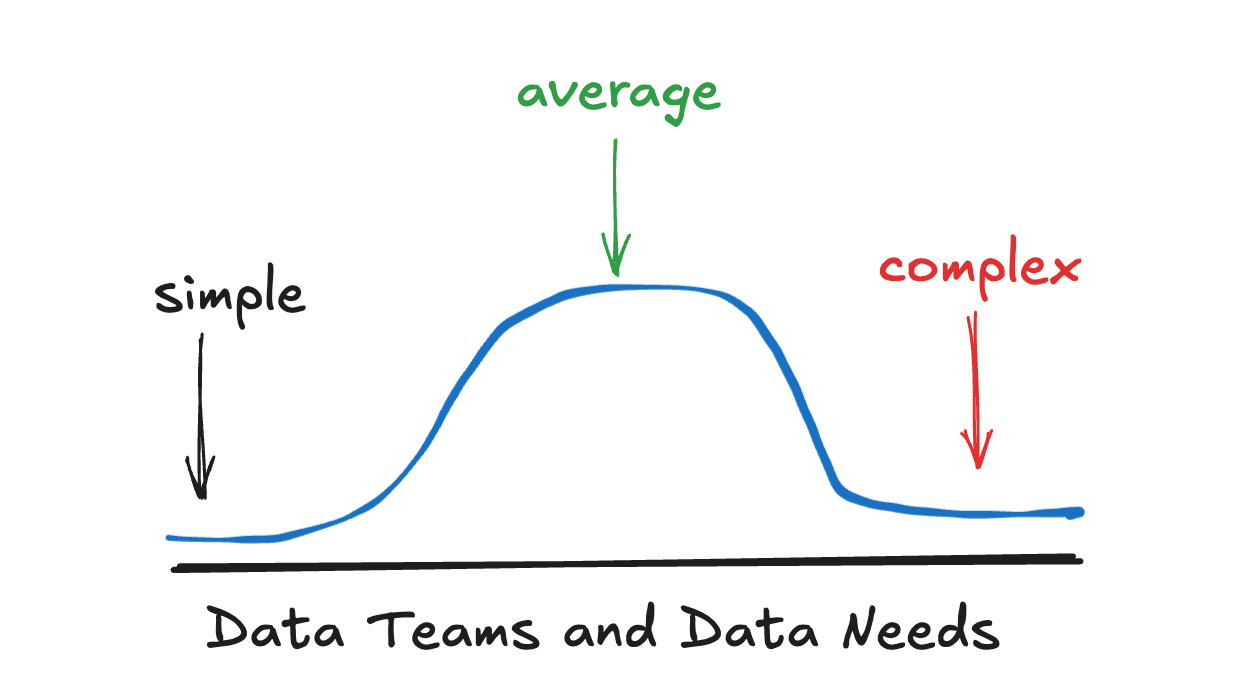
You will find a small cadre of Data Teams on the edges of the graph; some needs are very simplistic: ETL → Analytics → Done. Others will be much more complex: large teams with hundreds of data users, streaming, and complex real-time ML needs.
But mostly, there is a big lump in the middle where the needs are neither overly complex nor overly simple. Like Little Red Riding Hood, the portage is just right.
Yeah, well, so like what does that have to do with adopting Databricks?
Because … what you actually need out of Databricks is the single most important factor on how complex, long, and how you will climb over the fence into Databricks Land.
You will read docs, blogs, and listen to a consultant.
Your eyes will glaze over, and you will pass out with tears in your eyes.
All for nothing, probably. So, at a 10,000-foot level, how do you eat the elephant of migrating to Databricks? One bite at a time. Think about your current Data Platform, and what your next one should look like, within reason.
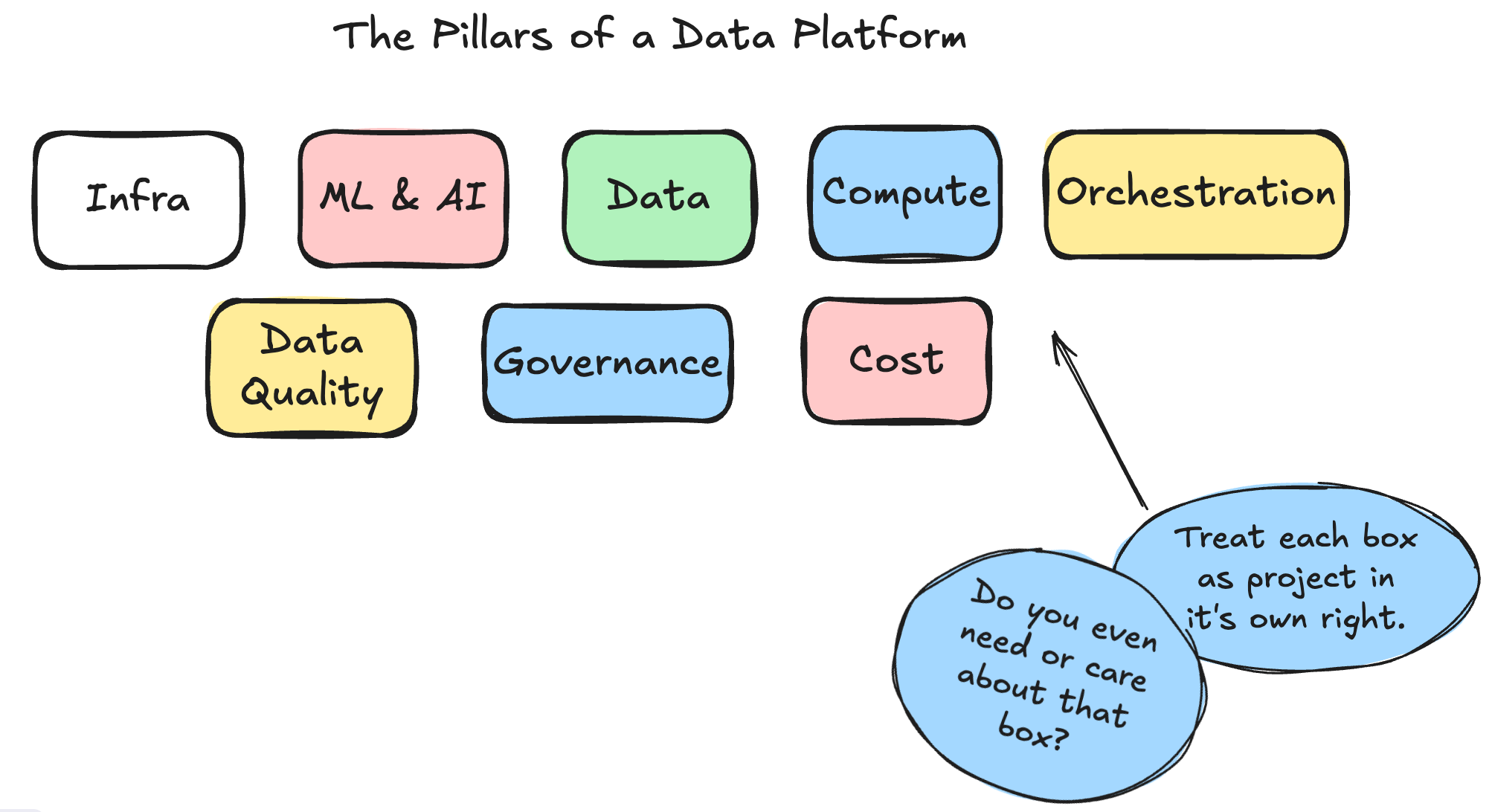
The truth is, some Data Teams are simply not at a place where they want, or NEED, to tackle some classic architectural challenges that other teams have as core to their business operations.
Some teams simply don’t prioritize Data Quality
Some teams have no need for Machine Learning or AI
Some teams don’t have enough usage to worry about Governance
Hacking off whole blocks of complexity and architecture that simply have no place or need in your context and the data team's needs is the first step in a migration.
For example, if your team practices ClickOps and has zero plans to adopt Terraform or codify your Databricks infrastructure, then there is a whole block of work/docs/practices you can simply skip over.
While this might be anathema to some, it’s simply the truth of the world we live in. Some teams simply don’t care about IaC or Data Quality. No amount of screaming and writhing on the ground is going to change that.
Ok, ok … but what about the practicalities of migrating a Data Platform?
Keep your pants on, Sunny Jim, I’m cooking slow and will get there in the end, don’t you worry. Before we get into the nuts and bolts, I want to encourage you to think at a high level about how these concepts apply to Databricks.
What I mean by this is that your best chance of a successful migration to Databricks as a Data Platform is going to be an unrelenting focus on the core principles and ideals that make a Data Platform “good,” and then applying Databricks concepts to those principles.
Another way to say this is that good Data Platforms built to last embrace fundamental tenets and use a specific technology, in this case Databricks, to implement those north stars. Not the other way around.
Don’t let the SaaS tool force you into thinking a certain way, or into a box; you set the gold standard, and use the tool(s) to achieve those goals.
Fundamentals of Databricks as a Data and AI Platform.
“Yeah, well, quit the jaw-jacking and get to it, would ya?” Not until you hit that subscribe button … and hit it hard!
I’m just going to back the truck up and dump on you. Ya’ get what you ask for, now what?
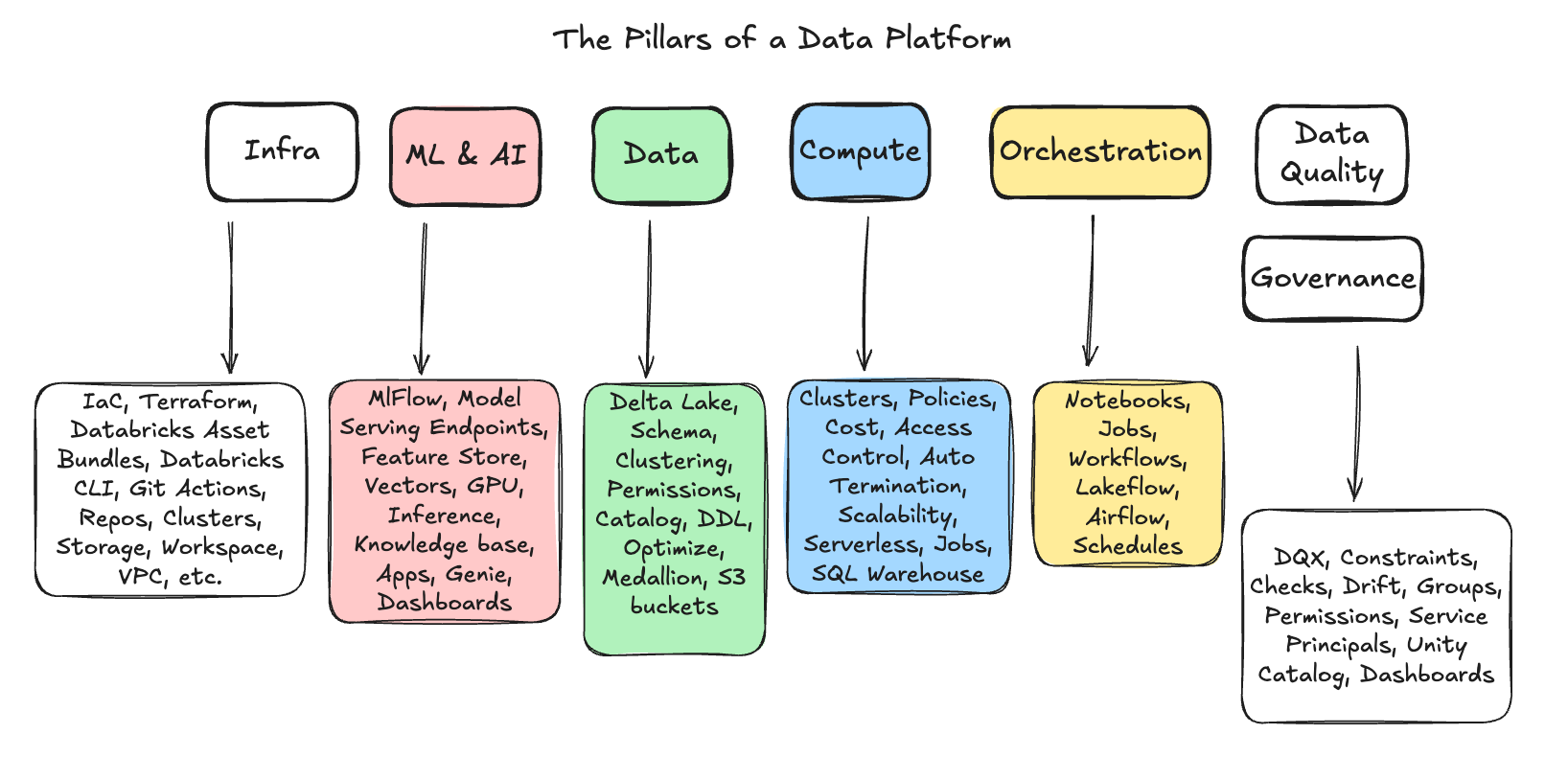
Sure, Databricks has a lot of features, and each architectural box has its own set of features and concepts you will need to learn in “the Databricks way.” One could argue that this isn’t actually the hard part, though; it’s just Engineering.
Again, most Data Teams will not need every feature Databricks offers. In fact, it’s best to start a migration with bare bones, a focus on the underlying infrastructure and data that can eventually support all those sparkles and unicorns you want in the end.
The other problem is, that Databricks changes features, naming conventions, and adds new bells and whistles faster than you can keep up with. By the time you implement on thing, it’s half depreciated in favor or something else.
Starting Somewhere.
When you start a brand new migration to Databricks, green-field project, or otherwise, it’s best to start with the context of your current state, where you want to go, and how the entire system should be laid out. This will take two forms as things start to take shape. Cloud Infrastructure and Data.
(I am going to gloss over a multitude of important details, particular to everyone’s specific requirements, and rather take a high road that can be applied to everyone, generally.
Databricks and Cloud Infrastructure (AWS, Azure, etc.).
The pipelines that allow your Databricks Account to exist.
Data Layout and Model.
Why start with these two topics? Because they bleed into each other, and if you start down a path without the other in mind, chances are you are going to end up on a dead-end, and doing a switch-a-roo mid migration.
At this point, you’re going to have to decide which road you are going to choose.
ClickOps
DevOps
Either you’re going to codify that underlying basic infrastructure on which Databricks will run (like AWS), in terms of VPCs, S3 buckets, etc, etc, or you are going to wing it via the UI.
Many folks would have you believe that only death and destruction await ClickOps, and indeed you will incur immediate Technical Debt, and pain later, but, beauty is in the eye of the beholder and these things rarely change, never say never, and you can ClickOps your way into a probably 2 years of Databricks core infastructure usage before the piper will come calling.
Starting with Dev, Prod, Workspace, User, Data, Catalog, and Schema decisions.
There are numerous basic concepts in Databricks related to resources and objects, how they are organized and interact with one another, and how they interact with you. The best part? The answer is it always “depends” on what YOUR needs are.
How do you want to separate your environments? Development, QA, Production? How are you going to control, separate, and manage your data and users? Before creating your Databricks infrastructure, you need to conceptually determine how you will approach these problems.
This is, of course, a gross oversimplification, but here are the major concepts and components you need to decide how you will configure them and lay them out to best fit your needs.
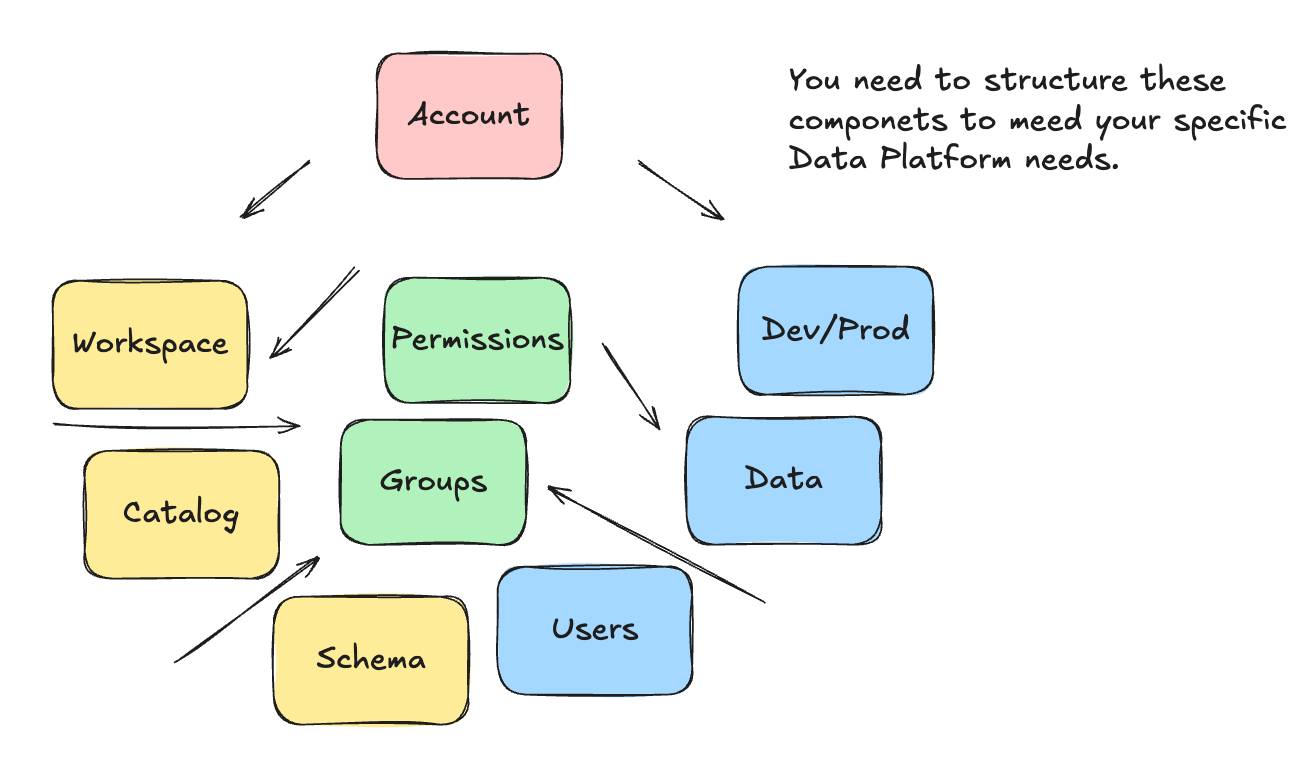
This is where things can get interesting. Maybe things have changed, but as of a few years ago, it was hard to find Databricks documentation that said, “This is how you actually do it, lay out your architecture like this.”
There are many high-level architectural documents and official blogs on the conceptual components, but very little “this is the way.” For example, read this high-level architectural documentation.

Even the official “reference-architecture” from Databricks really just skips all these core details of how you are going to lay out Accounts, Workspaces, Catalogs, Schemas, etc.
Is there a right way and a wrong way? I’m sure there are opinionated people everywhere willing to say yes, according to Databricks and the multitude of different Data Teams and use cases… probably not.
Of course, there are many common patterns across ANY Data Platform that indicate a clear separation between Production and Development environments, and careful consideration of who has access to what.
Laying out your Databricks environment.
The first step is to decide how you want to govern your data and people using Accounts and Catalogs. These are the highest, and arguably most important, thinking about Account and Catalog as the first building blocks to lay into place.
You can get this sense from reading what Databricks has to say about Catalogs, as seen below.

“A catalog is the primary unit of data organization in Databricks …
Catalogs are the first layer in Unity Catalog’s three-level namespace (catalog.schema.table-etc). They contain schemas, which in turn can contain tables, views, volumes, models, and functions. Catalogs are registered in a Unity Catalog metastore in your Databricks account.” - Databricks docs
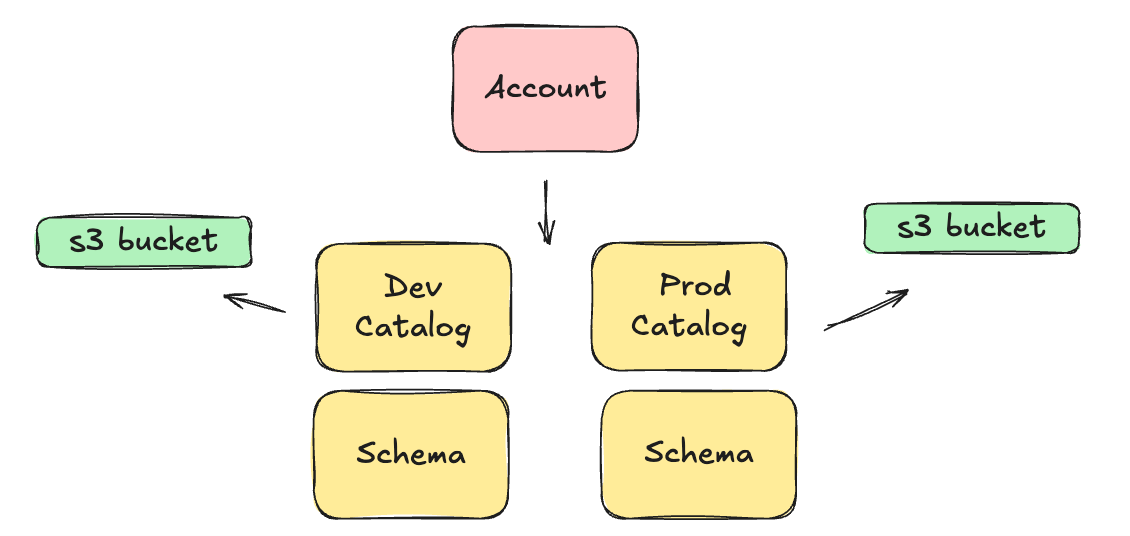
Most of the time, a Catalog has its own storage location, say an S3 bucket, which makes it the primary and best way to separate concerns and data. Of course, if you’re hardcore, you could even use different Databricks Accounts for total isolation of sensitive data.
For example, not saying you should, or should not, do this; but here is a an example of using a single Databricks Account, with multiple Catalogs, to seperate Production and Development environments.
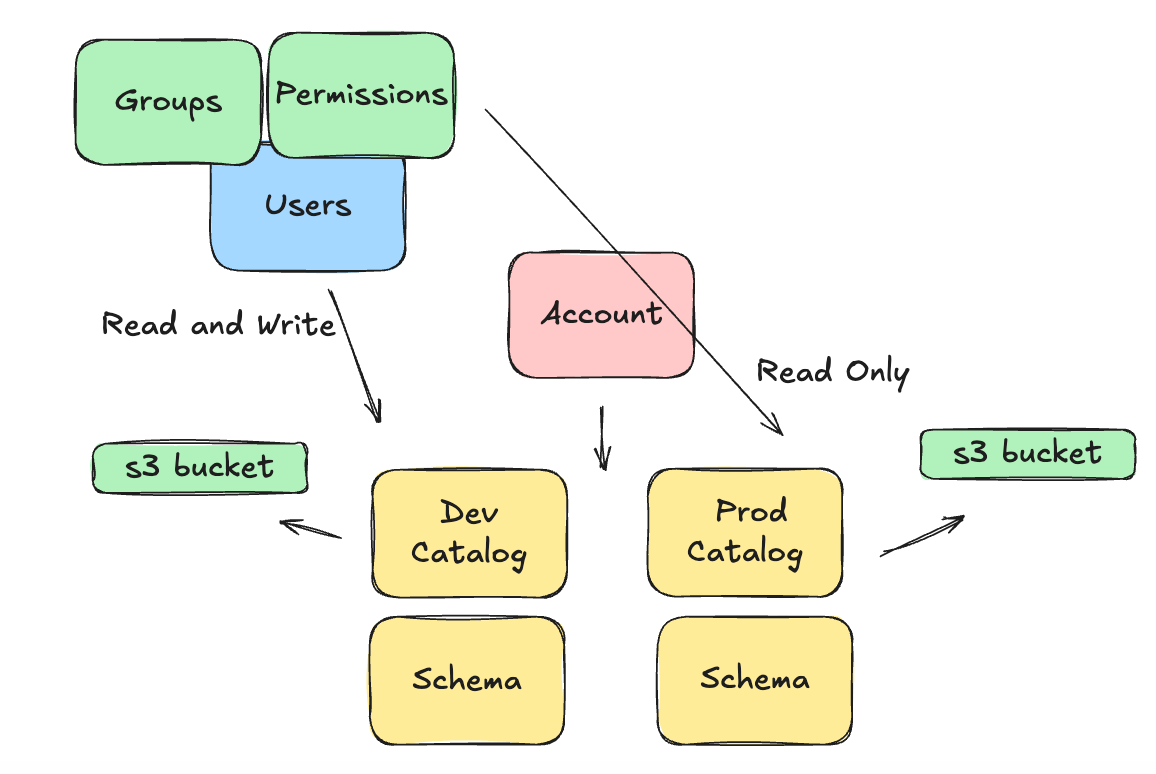
What makes this even harder, or more interesting, is that objects like Groups, Users, and Permissions are totally separate and can be APPLIED to these architectural concepts we listed above.
This makes the world of “what is possible” and “how should we control data and people” a decision tree with endless possibilities, largely driven by the size and needs of your data organization.
Case in point, it’s easy to say such and such a group of Users has READ ONLY access to Production Catalog, but READ WRITE to Development Catalog. Of course, I’m glossing over things, but you get the idea.
You want to know what’s interesting? This isn’t that far of a cry from what Data Platform Teams have been doing for decades; it’s just with a new set of tools and concepts. We’ve been paying attention and designing systems to control data and how people can use it for a long time.
My oh my, just think, we haven’t even scratched the surface of how to build and deploy code/pipelines, manage compute, how to manage Machine Learning and AI lifecycles, and even orchestrate those data processes with things like Airflow and Lakeflow.
The Data (Delta Lake or Iceberg) Models.
The Databricks data layer is likely one of the easiest parts of the migration or design project to manage. Not because data modeling in and of itself is easy or straightforward, but because most data teams and platforms already have a well-defined data model that is pretty clear.
The best part about the Lake House platform is that it’s not a far cry at all from the classic Data Warehouse or Data Lake. Many of the same patterns can, and do, apply well in a Delta Lake environment.
You are free to choose …
Kimball style dimension modeling

The Lake House platform on Databricks is agnostic to your data model. Choose what you like to work with and what works for you. Sure, there are tradeoffs to be made, as with anything, but you will survive this choice. It’s easy enough to design your Delta Lake DDL as you see fit.
What you really need to pay attention to is …
OPTIMIZE and VACUUM
But, these are more technical and engineering-related; they can simply be learned by picking up best practices, reading documentation, watching videos, and taking courses. It’s just a simple engineering problem.
What you need to consider is how this data fits into your larger data platform, who has access to it, who can do what to it, where it’s stored, how it’s queried, and how it's maintained.
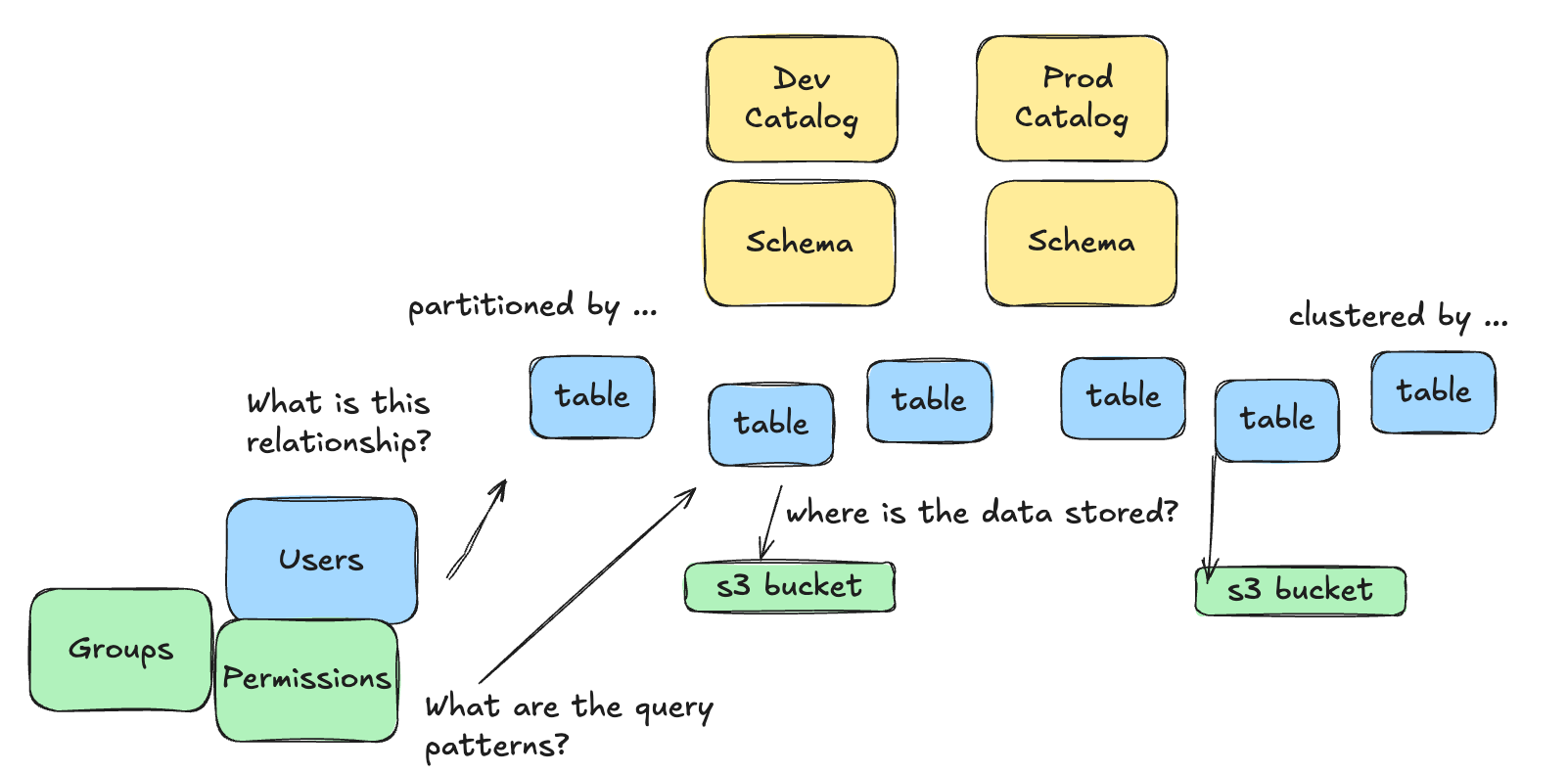
These are interesting considerations and provide a feedback loop into the overall Databricks architecture and design, particularly how you lay out Accounts, Catalogs, Schemas, etc.
There is no one-size-fits-all; that’s impossible. Every data team is different, with distinct data, users, and needs.
The Code (Notebooks, Terraform, DABs, SDP, Git, etc.)
This is another hotly contested part of any Databricks migration or green-field project, mostly because it can’t be skipped, and there is a wide variety of teams, experiences, and developers that land here, there, and everywhere.
Some of this is due to the pace at which Databricks releases features, and some is due to teams taking their codebases more seriously than others. You have a few MAJOR options when it comes to your code and pipelines, and HOW you actually decide to process your data pipelines.
Remember, HOW you write your data pipeline code is only half as important as how you manage that codebase and deploy into different environments in a testable and automated way.
Databricks Asset Bundles
Python WHL files
Scala
Regular zip’d Spark pipelines
Notebooks
PySpark
SparkSQL
A mix of the above
Spark Declarative Pipelines
The UI
Lakeflow
That’s just to name a few, oh, and you can deploy these in any number of ways. CLI’s, Git, API, blah, blah. This space, the generation and deployment of data pipelines, has undergone a cadre of development and changes recently in Databricks.
Suffice it to say, most likely, you deploy your code a certain way today. Maybe it’s GitHub actions, or something else. There’s a good chance you can simply modify that process slightly and get the same general results and feel that you have today.
The big difference is that in Databricks, you’re dealing with a lot of Spark and Python, so certain ways of writing and deploying that code simply are better and smoother than others.
For example, if you’re familiar with config-as-pipelines, such as dbt or similar, Databricks Asset Bundles might feel like a natural fit.

Heck, maybe Lakeflow and Spark Declarative Pipelines feel like a more scalable approach.

Again, there are endless ways to actually write your Databricks data pipelines, many different approaches and tools, one of which will feel comfortable to you, and fit well within your team’s skill set.
What you need to think about in the beginning, though, is HOW the code and development changes will flow from an individual contributor, into a codebase, and somehow be deployed for testing and production.
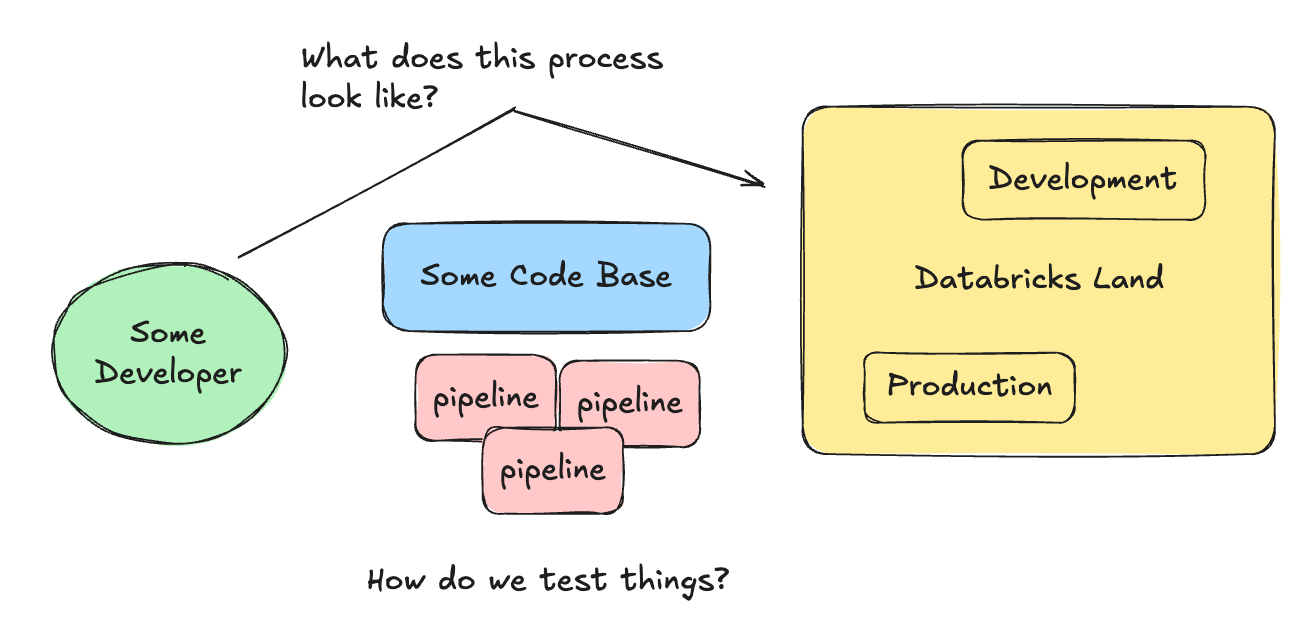
If we design a North Star we want to arrive at, maybe Databricks Asset Bundles in conjunction with GitHub actions, the picture becomes much clearer and concise.
The Compute (Serverless, Jobs, Warehouses, etc.)
I wanted to touch on compute as part of the thought process for understanding how to migrate to Databricks, because there is surprisingly significant complexity and change in this area. Most importantly, this is also one of the largest cost drivers.
Compute on Databricks is often treated as something you can get to later, but that is a mistake and leads to cost overruns.
Some key concepts to grasp are …
What type of compute is available to use?
HOW can Users interact with that compute?
For example, do you want a Data Analyst to have access to an All-Purpose Cluster (classic compute) that allows them to build and scale a cluster of any size, with no auto-termination? Uhhh … bad idea after a long weekend.
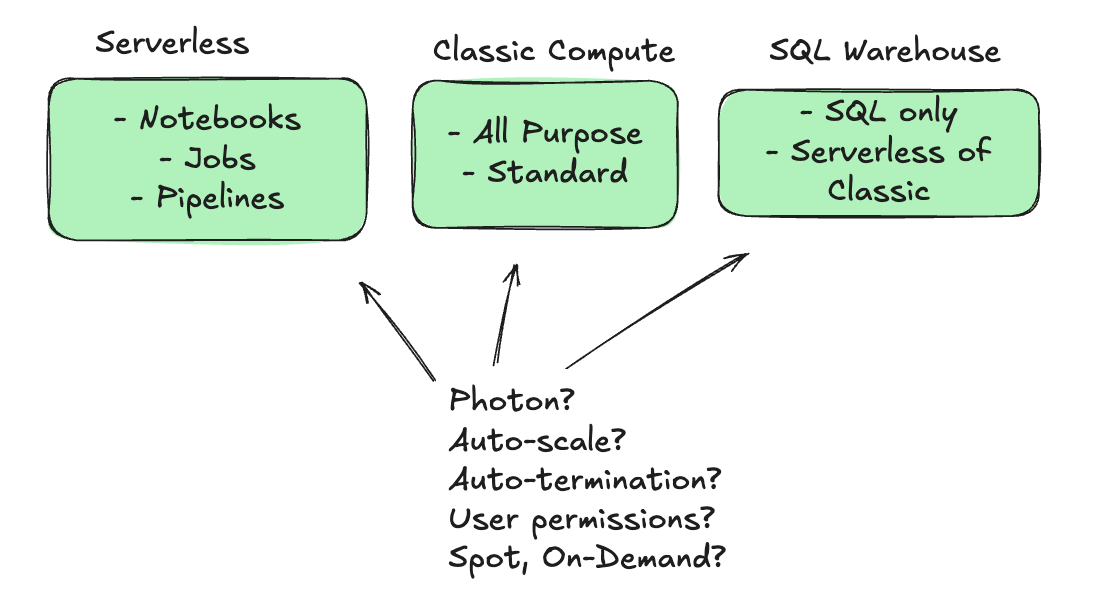
People can create clusters from the UI, we can define clusters of all sorts of IaC in vareity of manners, we can define them in Jobs, the list is endless.
What type of instances should we use? How much volume storage should they get? How do we pick between Serverless and Non-Serverless options? Should we use Photon?
Ummm … yeah. That’s going to take a little reading and noodling on your part. Preferred before you start actually deploying and running data pipelines on Databricks.
The Orchestration (Airflow, Lakeflow, etc.)
I wanted to briefly touch on orchestration because no Data Platform is complete without a well-rounded solution. Until recently, Databricks offered either no options or very limited ones with Workflows, as they were called back then.
In real-world production environments, Data Teams need a well-rounded, robust way to monitor, schedule, and debug a wide range of data and machine learning pipelines.
Databricks has made advances in this category with Lakeflow, and you can now perform and schedule tasks on par with top-tier tools like Airflow.

I suggest you read my deep dive into Apache Airflow vs Databricks Lakeflow to better understand the challenges you will face and the real-world implications of the choices you might have to make.
There is no desire on my part to push you into any one direction. Of course, there are numerous well-known data orchestration tools that integrate seamlessly with Databricks. Or, you can simply use Lakeflow from Databricks to do all that orchestration and scheduling you need.
I don’t care. Just think carefully about your choice at an architectural level. What makes sense for you and your team? How will it fit into the bigger picture? There are many trade-offs to consider; only you can see them and make that decision.
Wrapping it up.
I’m not sure how helpful or unhelpful that was. For anyone who’s spent time on Databricks, you will know that I barely scratched the surface, if that, on most topics. You will also understand that there are many ways to accomplish the same task, and that, starting from zero, it’s important to get the basics down first.
As with any new tool or platform, old and bad habits will follow you and haunt you if you don’t deal with them.
There is a clear lack of a “This is the Bible” on how to migrate to or implement Databricks. But that is because teams and needs vary so widely across the landscape; it’s impossible to prescribe one approach for a team with hundreds of users and another with 15.
As always, nuance is key, and the devil is in the details. Keeping the core tenets of a Data Platform, Databricks or otherwise, top of mind is a sure way to stay on the straight and narrow path that leads to success. There are plenty of ditches to fall off on either side, if you get drawn away into endless arguments about tools and focus on the minutiae rather than the big picture.

Nice post! Am I misremembering though? I thought it was Goldilocks who found the [porridge] just right.