

AWS Lambda MicroVMs - What new devilry
example with Polars and CSVs


This is a strange feeling for me. Something new and exciting from AWS besides another mass layoff? What’s wrong with those people? It’s almost like they care or something. Definitely sus. If you’re like me, you’ve spent decades under the big thumb of that not-so-benevolent AWS Cloud.
Our lives and work are consumed by that company; every twitch they make sends ripple effects down the long terminal halls of bits and bytes, eventually breaking some 5-year-old boto3 call in Python running on a decrepit EC2 instance via cron.
I’ve had to bear the brunt end of the sharp sticks they poke into the eyes of the software masses. IAM, Glue, Athena, dear sweet Jesus … EMR, Redshift, Fargate, Lambda, MWAA, the list simply never ends.
To be honest, I’d given up hope that anything useful or interesting would come out of AWS at this point. Then, lo, I heard the voice of one crying in the wilderness, “… prepare the way for AWS Lambda MicroVMs, make their path straight.” I said, here am I, send me.
Like a breath of fresh air on the face, a bubbling stream in the forest, a warm fire in the winter … this is what my poor heart felt when I first heard the whispers of AWS Lambda MicroVMs.

Thanks to Delta for sponsoring this newsletter! I use Delta Lake daily, and I believe it represents the future of Data Engineering. Content like this would not be possible without their support. Check out their website below.

A new era of compute?
Funny to think about the large swath of end-user products built upon those two behemoths of compute, EC2 and Lambda. I think it’s fair to say that if you locked yourself in an oven with your laptop and were given a day to design and write some SaaS thiny-ma-bob, and were only given EC2, Lambda, and pick-your-poison language, it could be done.
Part of me wonders if the collective “meh” from the jowls of the software community at large at the announcement of AWS Lambda MicroVMs has to do with the satisfied, comfortable compute blanket we find ourselves wrapped in today.
Who needs something new when there's the reassurance of familiar things that work well enough?
These MicroVMs seem to sit inside the gap between AWS Lambda and EC2 instances. Does this broaden the market for use, meet pent-up demand, or simply fill a small niche?
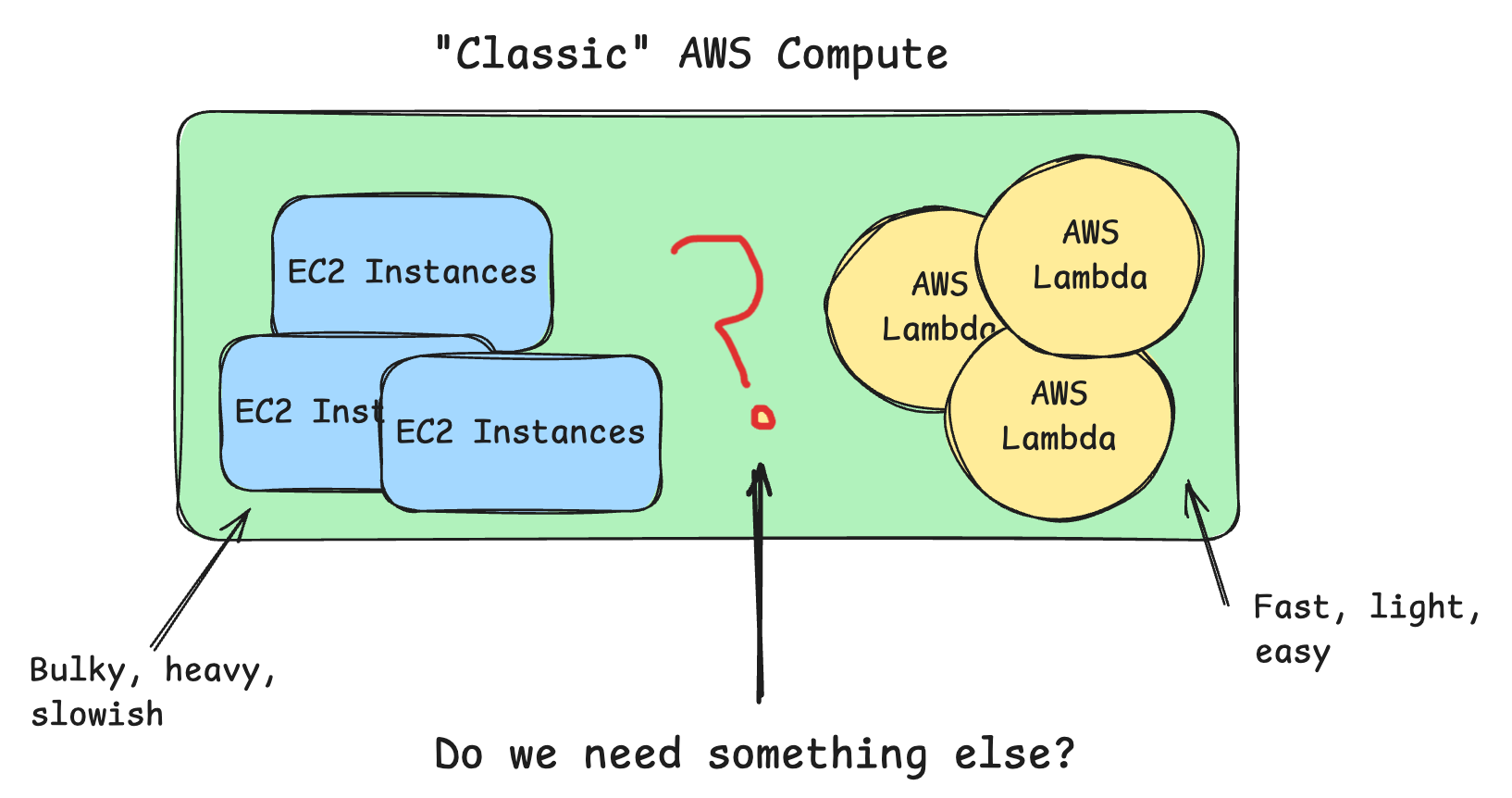
I mean, the world as we know it is practically built on these two compute options from AWS: EC2 and Lambda, which are at opposite ends of the spectrum.
The EC2 Workhorse
EC2 instances were launched in ~2006, making them probably among the oldest and best-known AWS services. I think EC2 boasts somewhere in the neighborhood of 600 different types/sizes. Everything from EKS to EMR, from Fargate to Beanstalk, is underpinned by EC2.
Of course, EC2 might seem simple on the surface, but it actually can be complex when sifting through 600 different options. CPU, Memory, Storage, Networking, Compute Types, Pricing Options, Backups, etc, etc.
This sort of unlimited flexibility and customization is foundational to what makes EC2 compute so attractive; you can build your own puzzle and get exactly what you need.
The Lambda Workhorse
My personal favorite AWS compute option has always been Lambda. The simplicity, speed, and scalability of Lambdas unlocked new ways to architect systems of all kinds. From SFTP servers to data pipelines, from messaging systems to HTTP routing. Lambdas are just as flexible as EC2, but smaller, faster, and more lightweight.

There is just something so sweet and simple about a Lambda that triggers when you want, does a little work when you want, then disappears without you ever knowing.
Versatile, fast, flexible, and simple. Core tenets of good software engineering.
For *most people, Lambdas are incredibly cheap as well.
The empty space … the gap.
As much as I don’t like to admit it, AI- agentic software, some call it- appears to be a large reason why AWS MicroVMs came into being. At least, the marketing and documentation seem to indicate this.
I know for a fact that the inner sanctum of AWS has been thinking about this “gap” or “problem” in compute offerings for some time now. Mistakenly, in 2023, while bored on some lazy Sunday afternoon, I wrote about AWS Lambda, Python, and Rust.

It gained quite some traffic, and must have ended up on the desk of the power brokers inside AWS. A short time later, I found myself sitting digitally across from some folks on the AWS Lambda team, having my brain pulled apart about the best and worst pieces of Lambda.
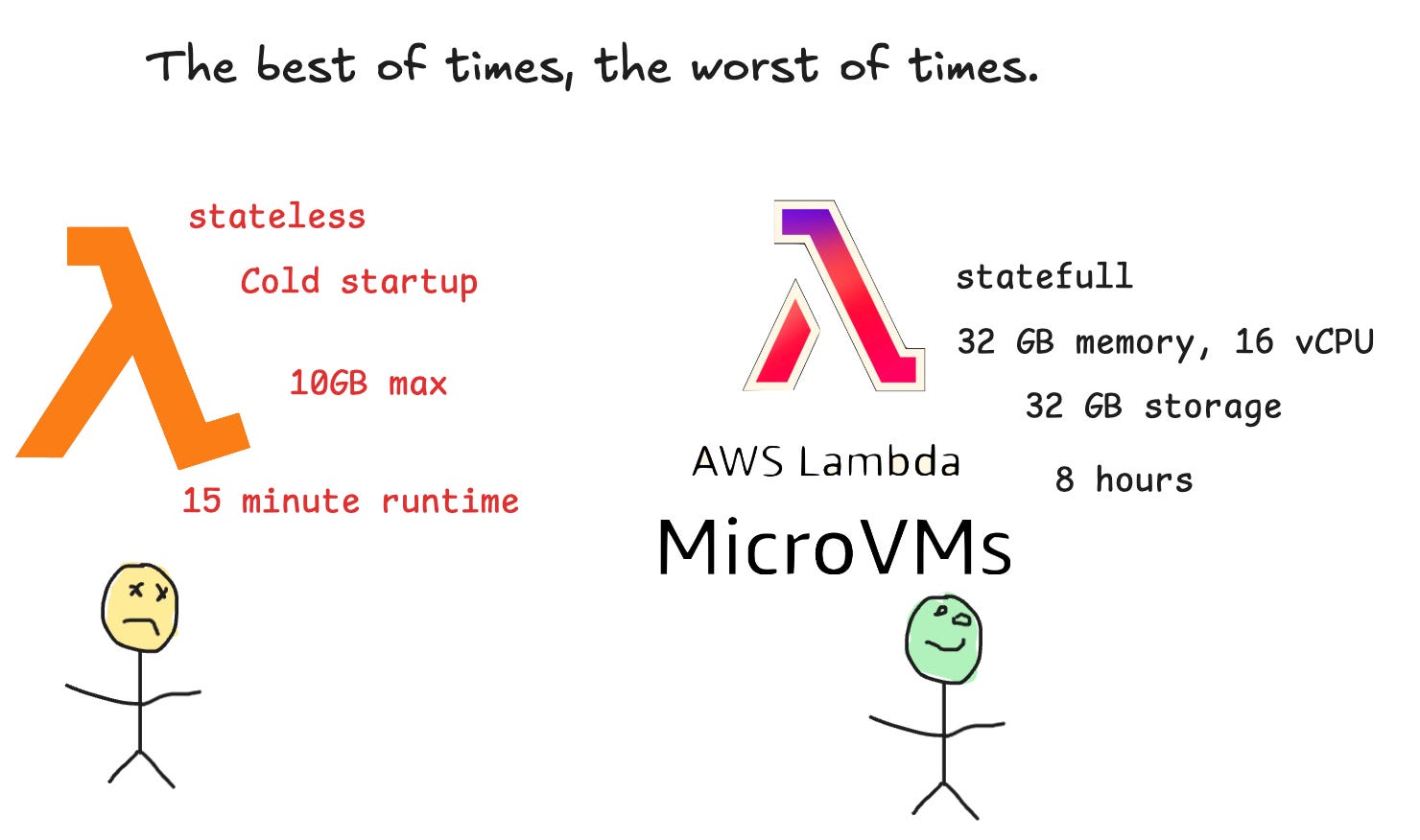
On many fronts, AWS MicroVMs seem to answer these challenges of bridging the gap between Lambda and EC2. There are many use cases where you want the speed, simplicity, and scalability of a Lambda, but WITHOUT the time and memory limits, and where you need the flexibility and size of an EC2 instance.
Sure, you could just leave Kubernetes or an EC2 Cluster running in Fargate or somewhere else, but these are very heavy engineering solutions, complex, they take time and engergy away from solving the core issue, AND they force you into a certain architectural box when solving problems.
With all this as background, let’s explore AWS MicroVMs by putting our hands to the plow.
Not so gentle introduction to AWS MicroVMs
Ok, for you and me, this will be trial by fire; it is new for us and everyone else, so let’s start with concepts, then move on to more details, and finally to implementation. My goal is not to make anyone an expert, but rather to introduce this tool as a new pattern and architectural choice when designing software solutions.
We might not be putting MicroVMs directly into production, but we are learning and growing, expanding our horizons, and keeping abreast of the changes that are lofted upon us.
concepts
details
implementation
AWS has introduced Lambda MicroVMs, a new serverless compute service designed for applications that need to securely execute code written by users or AI models. Think coding assistants, online IDEs, data science notebooks, SQL playgrounds, or SaaS applications that allow customers to run custom Python or JavaScript.
One of the big innovations here is that every user or job gets its own isolated virtual machine, but without requiring you to manage EC2 instances, containers, or Kubernetes. Again, this is Lambda-ish, obviously, and it's probably one of the biggest selling points.
“I can get the power, size, and configuration of EC2 instances (almost), with the added simplicity of AWS Lambdas. You can have your cake and eat it too.”
- Me
Unlike traditional Lambda functions, which are stateless and short-lived, Lambda MicroVMs combine three capabilities that previously forced developers into trade-offs:
VM-level isolation so one customer’s code can’t interfere with another’s.
Near-instant startup using Firecracker MicroVM technology.
Suspend and resume support, allowing a MicroVM to preserve its memory and state for up to 8 hours instead of starting from scratch every time.
AWS says this is built on the same Firecracker virtualization platform that already powers more than 15 trillion Lambda function invocations every month, but now developers can directly use that technology rather than having it hidden behind traditional Lambda.

Deploying one is straightforward. You package your application as a Docker image, create a MicroVM image from it, and launch isolated MicroVM instances as needed. Each instance has its own dedicated HTTPS endpoint that supports HTTP/2, gRPC, and WebSockets, making it easy to build interactive applications.
This was a bit I found interesting, but it sorta makes sense in the light of the Agentic and AI use cases that AWS seems to be focusing on out of the gate. HTTP endpoints as an entry point for MicroVMs.
The service can be deployed using familiar AWS tools such as the Lambda Console, CloudFormation, CDK, or the Agent Toolkit for AWS, making it fit naturally into existing AWS workflows.
Pricing is also different from Lambda Functions. Instead of paying only per request and execution time, you pay for a baseline amount of compute while the MicroVM is running, with additional charges only if your workload temporarily exceeds those baseline resources. This reflects that a MicroVM is designed to remain alive and preserve state rather than disappear after each request.
Again, this seems to be a fundamental shift in the compute technology AWS offers. Time will tell if it can fight its way to anywhere near the top of the AWS compute stack; it’s hard to say- old habits (lambda + EC2) die hard. Either way, we have a new option when designing bespoke systems.
Previously, you generally had to choose between:
| Want...              | You used... | Problem                    |
| -------------------- | ----------- | -------------------------- |
| Fast startup         | Lambda      | Stateless, 15 minute limit |
| Long running process | ECS/Fargate | Infrastructure overhead    |
| Strong isolation     | EC2         | Slow and expensive         |
| Per-user sandboxes   | Kubernetes  | Operational nightmare      |
Why This Matters
This is less about replacing Lambda Functions and more about filling the gap between Lambda and containers.
Previously, developers had to choose between:
Lambda offers speed and simplicity but sacrifices persistent state.
ECS/Fargate for long-running workloads, but manage container infrastructure.
EC2 for complete control and isolation, but at the expense of serverless benefits.
Lambda MicroVMs aim to combine the best of all three by offering isolated, persistent, serverless virtual machines with minimal operational overhead.
For AI applications in particular, it’s a compelling fit. Every AI agent, coding assistant, or customer session can have its own secure execution environment that starts almost instantly, stays warm while in use, and resumes exactly where it left off. That’s something traditional Lambda simply wasn’t designed to do.
A few MicroVM details to cover.
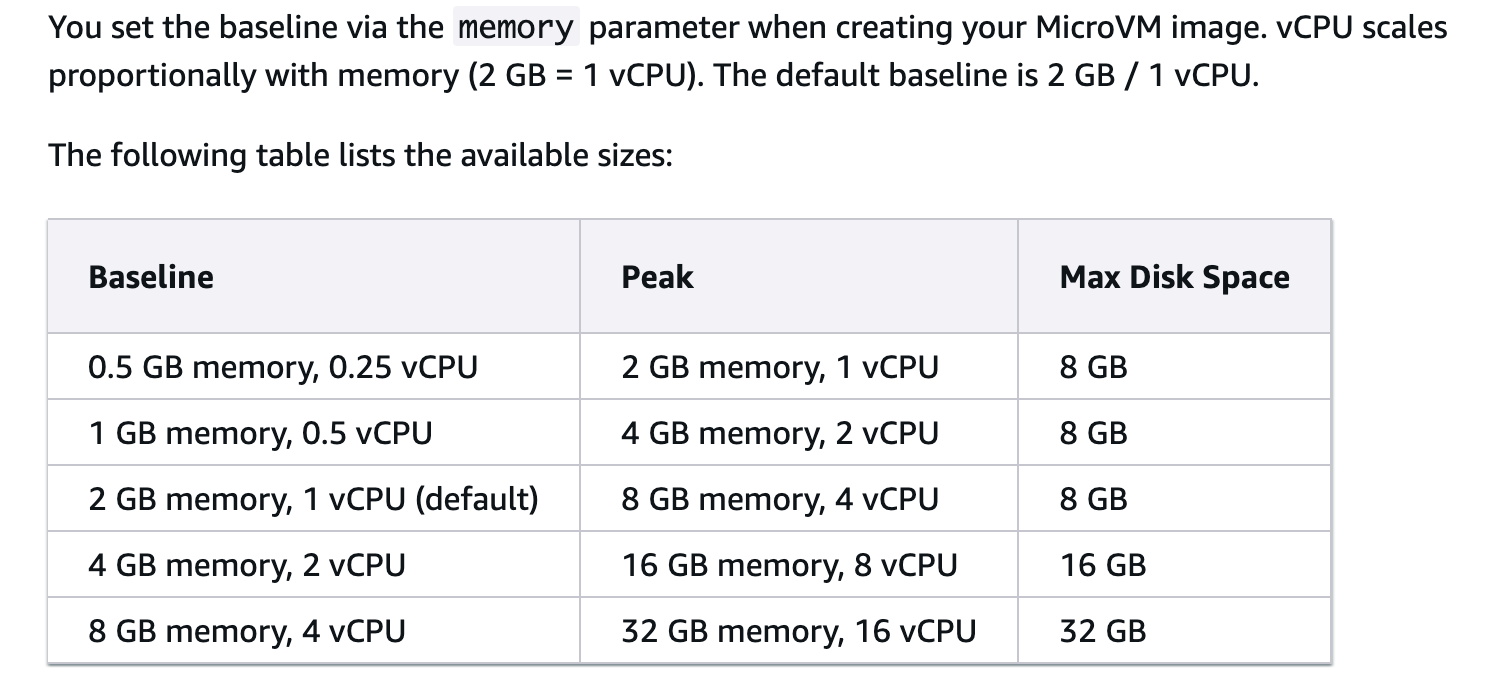
We should take a few moments to just to cover some technical details found in the MicroVMs AWS docs. Here are some of the most exciting stats: we are no longer bound by a 10 GB memory limit. I was surprised we can only get 32GB max, I mean, we will take it, hopefully some larger sizes come soon enough.
Also, to create a MicroVM Image, you provide a zip package that contains a Dockerfile and your application artifacts, which you upload to Amazon S3.
Dockerfile
code artifacts
S3
Also, there is a concept of States; this will be an important part of MicroVMs and a change from Lambdas. We are now entering a world of Lambdas with State.

MicroVMS are HTTP machines.
This is probably the most telling and disappointing part of MicroVMs, at least from my point of view. When reading the docs, marketing, blogs, etc, it’s clear they are pushing the AI agentic narrative. Also, this could just be my disappointment with what AWS thinks is necessary.
These MicroVMs are, in essence, long-running HTTP servers.
What I mean is that their functionality is wired to be HTTP-centric: communication happens over HTTP; there is no “trigger” logic like a normal Lambda.
1. Why is an HTTP server the entry point?
MicroVMs are not invoked like Lambda functions. No handler (event, context); no event payload delivered to your code. A MicroVM is a long-running VM exposed as an HTTPS endpoint; you talk to it over the network.
So the app must be an HTTP server listening on a port (8080). Two reasons:
- The trigger is an HTTP request (see part 2).
- The lifecycle hooks are themselves HTTP endpoints that Lambda calls during build — GET /aws/lambda-microvms/runtime/v1/ready, /validate. Even a pure batch job has to serve those paths, or the snapshot never completes.
An HTTP server is structural to the MicroVM model. That part is not a choice.Of course, like any good engineer, we can twist and mold whatever we like to do whatever we want, even if it’s not made to do that.
MicroVMS in action.
The moment we’ve all been waiting for. You and I both, but I think all the time we spent getting to this point was just as important. Heck, I have no idea if I’m doing MicroVMs any justice with all my musings and hot takes about having a new compute tool to re-architect systems.
Also, if we want to build a tool workflow, an actual use case for MicroVMs that has some basis in the real world, we need to come up with that and build to those specs.
Here is one.
## Automted Customer Data Dump Processing

A customer(s) periodicly dump large amounts of historical data in
CSV format. The business requires two things,
1. process that incoming data
2. report immeditaly with meta data/stats about that data dump.
It's important to note that this is not only a data processing task,
but more importantly, it serves to notify the relevant business unit
all information pertaining to the data dump by said customer.
This is an interesting problem, is it not?
Yes, we have a classic data processing problem to solve, which is not novel in and of itself at all. The second part, classically, indicates that a second part, just as important if not more so, is that we need to treat this historical data dump from a customer as a logical unit of processing in totality.
Next, that leaves us, as Engineers, to decide the best way to solve this problem.
Let’s say we have about 81.GBs of data to process, for this example, we will use the Backblaze hard drive open-source dataset. We will say, for argument's sake, that this data gets dropped all at once, as part of a customer’s data dump. CSV files to the last.
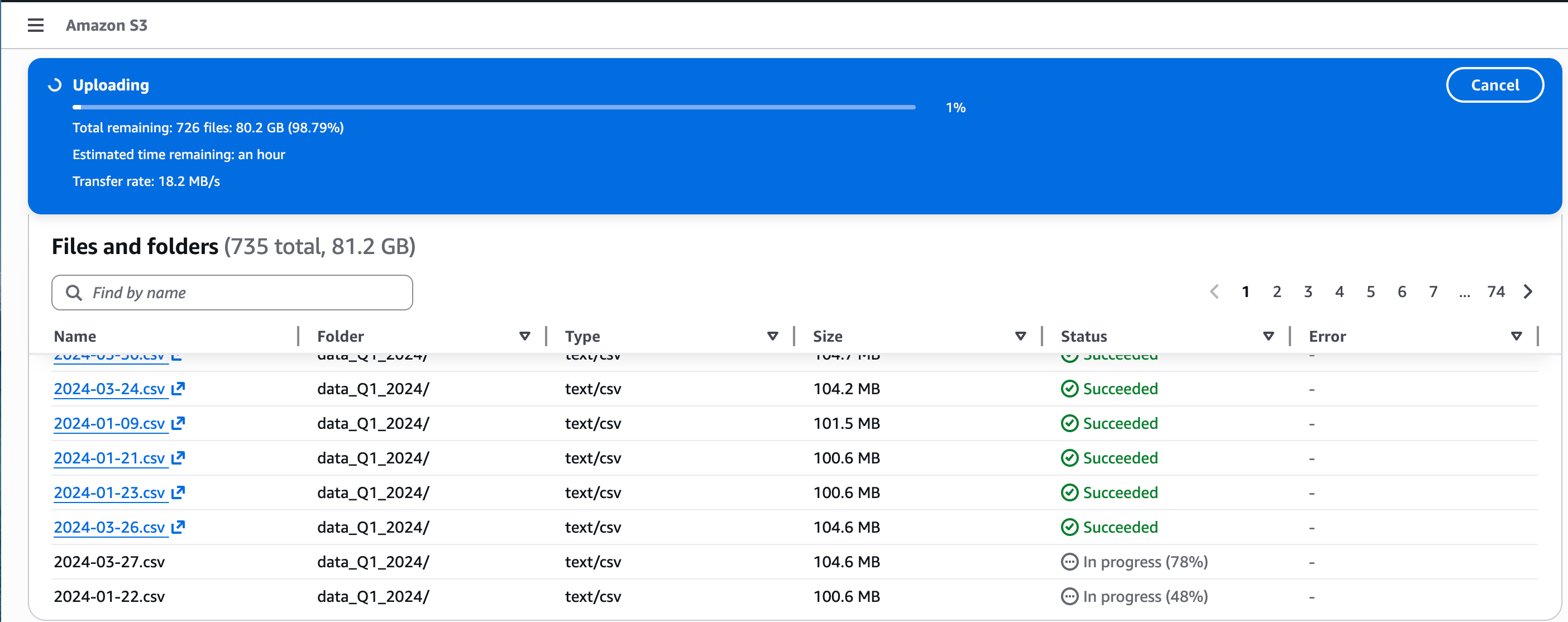
So classically, how would we chomp on 80GBs of data at once, at the same time recognizing we need to somehow treat this entire process as, at the very least, a logical unit of work? Because at the end of the show, we need to report all the stats back to the business.
Of course, maybe we could get away with using Lambdas if we processed the CSVs one by one, but this is problematic because Lambdas work independently of one another, are short-lived, and we would have to use some complex logic and something like a database to track everything we are processing and maybe even process final stats.
We want simplicity overall, first and foremost.
Also, it’s an option to spin up some EC2 on Fargate with enough spice to eat up this dataset with Spark, or maybe Polars or DuckDB in streaming mode. This also seems overkill, no?
Adding the overhead of some ECS cluster and figuring out the spin-up and spin-down of the large instance just seems unnecessary if we can find another way.
Let’s use a MicroVM to do this work in one fell swoop. The simplicity of a Lambdas in terms of architectual overhead and management, the size and capability of an EC2, no lambda small memory or time limits.
Brass tacks.
Again, we need a few things to actually build a MicroVM. First, a Dockerfile, our codebase, zip it, send it to S3.
Dockerfile
code as zip
send to S3
Of course, you can go into the AWS Console, under Lambdas, and find all the clickety-click buttons to create a MicroVM, as per below.
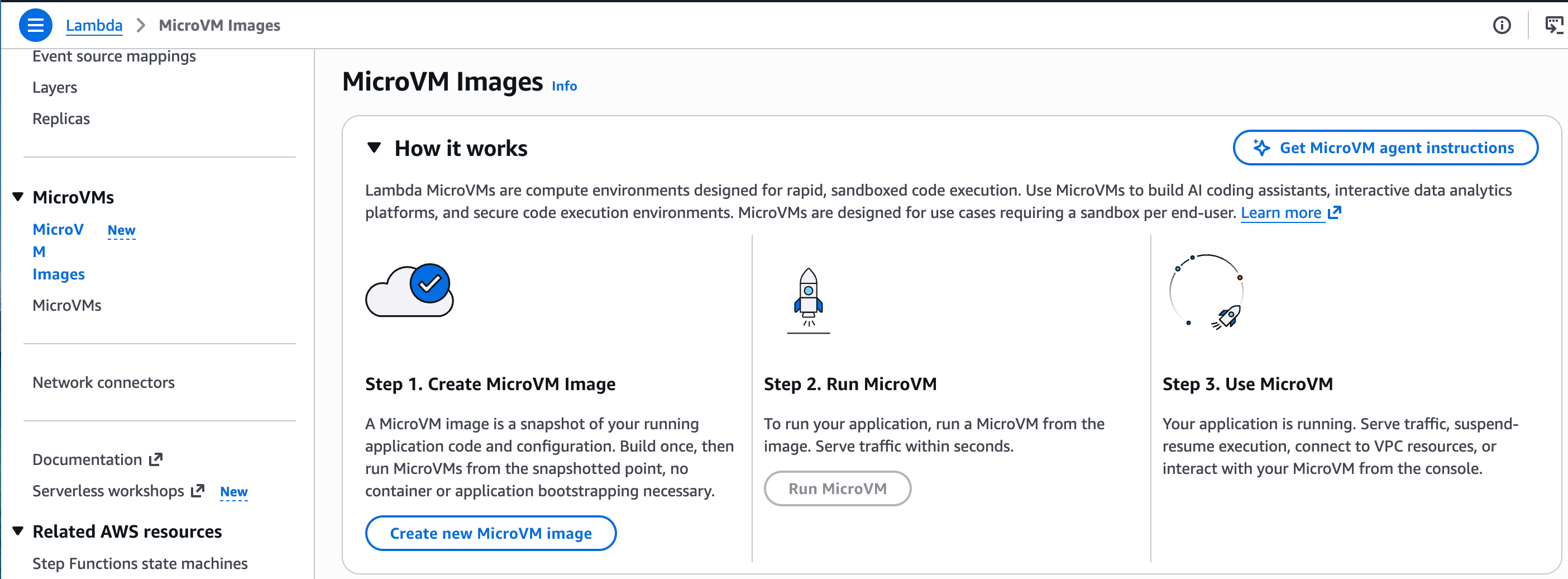
Below you will find all the code to create, update, trigger, and terminate a MicoVM. Here are the general steps that were coded to do all this. I wrapped everything, all these steps, into Bash scripts.
## Deploy — real AWS Lambda MicroVM

Prereqs: an S3 bucket for the code artifact, and an IAM **build role** (see `iam/`).

```bash
export ARTIFACT_BUCKET=my-artifact-bucket
export BUILD_ROLE_ARN=arn:aws:iam::123456789012:role/MicrovmBuildRole
export OUTPUT_BUCKET=my-output-bucket          # optional; defaults to ARTIFACT_BUCKET


aws iam create-role --role-name MicrovmBuildRole \
  --assume-role-policy-document file://iam/build-role-trust.json
aws iam put-role-policy --role-name MicrovmBuildRole --policy-name build \
  --policy-document "$(envsubst < iam/build-role-permissions.json)"

# 3. Build image → run MicroVM → trigger a dump run → tear down.
bash scripts/build_image.sh     # zips, uploads, create-microvm-image, polls to CREATED
bash scripts/run_microvm.sh     # run-microvm, polls to RUNNING, saves id/endpoint to .microvm
bash scripts/trigger.sh         # auth token + POST /process against the real dump prefix
bash scripts/teardown.sh        # terminate-microvm

bash scripts/update_image.sh    # (later) ship new app code as a new image version
These bash scripts, available on GitHub, just wrap the AWS CLI commands to work with AWS Lambda MicroVMs. I would say this is very similar to AWS Lambda, but differs in a few aspects.
We still can use a Dockerfile in conjunction with our application code.
We must build the image, deploy the code and Dockerfile into S3.
This CREATEs a MicroVM.
Now we must actually get the MicroVM into the RUNNING state.
After, it is RUNNING we can TRIGGER it with a call to its HTTP endpoint.
This is a little more than I bargained for, to be honest. There are a lot of steps and a lot of code wrapped in those Bash files. Ah well, we will see what comes next, eh? I will crack just a few of those files for you here, so you can get an idea, and figure if you want more you will head to the GitHub repo and try it yourself.
Let’s do this with code first. Starting with a few things, we need some IAM roles, etc. This is all available on GitHub.
aws iam create-role --profile confessions --role-name MicrovmBuildRole \
  --assume-role-policy-document file://iam/build-role-trust.json

aws iam put-role-policy --profile confessions --role-name MicrovmBuildRole --policy-name build \
  --policy-document file://iam/build-role-permissions.json
Set some ENV Vars …
export ARTIFACT_BUCKET=confessions-of-a-data-guy
export BUILD_ROLE_ARN=arn:aws:iam::992921014520:role/MicrovmBuildRole
export OUTPUT_BUCKET=confessions-of-a-data-guy
The next big piece of work in the MicroVM Dockerfile, critical and the core of making a new MicroVM on AWS. Also, make sure if you are using the AWS CLI commands like me, that you update your CLI to the latest version so the lambda-microvm commands are available.
Here is the Dockerfile itself. Super simple. We have to use FastAPI as a web server to handle the HTTP requests; more on this later.
FROM public.ecr.aws/lambda/microvms:al2023-minimal

WORKDIR /app

RUN dnf install -y python3.11 python3.11-pip && dnf clean all
COPY requirements.txt .
RUN python3.11 -m pip install --no-cache-dir -r requirements.txt

COPY app/ ./app/
COPY sample_data/ ./sample_data/

EXPOSE 8080

CMD ["python3.11", "-m", "uvicorn", "app.server:app", "--host", "0.0.0.0", "--port", "8080"]
Then we have to build and push the image with our code wrapped up in a zip to S3.
#!/usr/bin/env bash
# Package the app, upload to S3, and create the MicroVM image (poll until CREATED).
set -euo pipefail
source "$(dirname "${BASH_SOURCE[0]}")/config.sh"

cd "$ROOT_DIR"

echo ">> Packaging app.zip"
rm -f app.zip
zip -r app.zip app Dockerfile requirements.txt sample_data >/dev/null

echo ">> Uploading to s3://$ARTIFACT_BUCKET/$ARTIFACT_KEY"
aws s3 cp app.zip "s3://$ARTIFACT_BUCKET/$ARTIFACT_KEY" --profile "$AWS_CLI_PROFILE" --region "$AWS_REGION"

echo ">> Creating MicroVM image: $IMAGE_NAME"
aws_mvm create-microvm-image \
  --name "$IMAGE_NAME" \
  --code-artifact "uri=s3://$ARTIFACT_BUCKET/$ARTIFACT_KEY" \
  --base-image-arn "$BASE_IMAGE_ARN" \
  --build-role-arn "$BUILD_ROLE_ARN" \
  --environment-variables "OUTPUT_BUCKET=$OUTPUT_BUCKET,OUTPUT_PREFIX=$OUTPUT_PREFIX,DATA_SOURCE=s3"

echo ">> Waiting for image to reach CREATED (Ctrl-C to stop polling)"
while true; do
  state=$(aws_mvm get-microvm-image --image-identifier "$IMAGE_ARN" \
    --query 'state' --output text)
  echo "   state=$state"
  case "$state" in
    CREATED) echo ">> Image ready."; break ;;
    CREATE_FAILED) echo "!! Build failed. Check CloudWatch: /aws/lambda-microvms/$IMAGE_NAME"; exit 1 ;;
  esac
  sleep 10
done
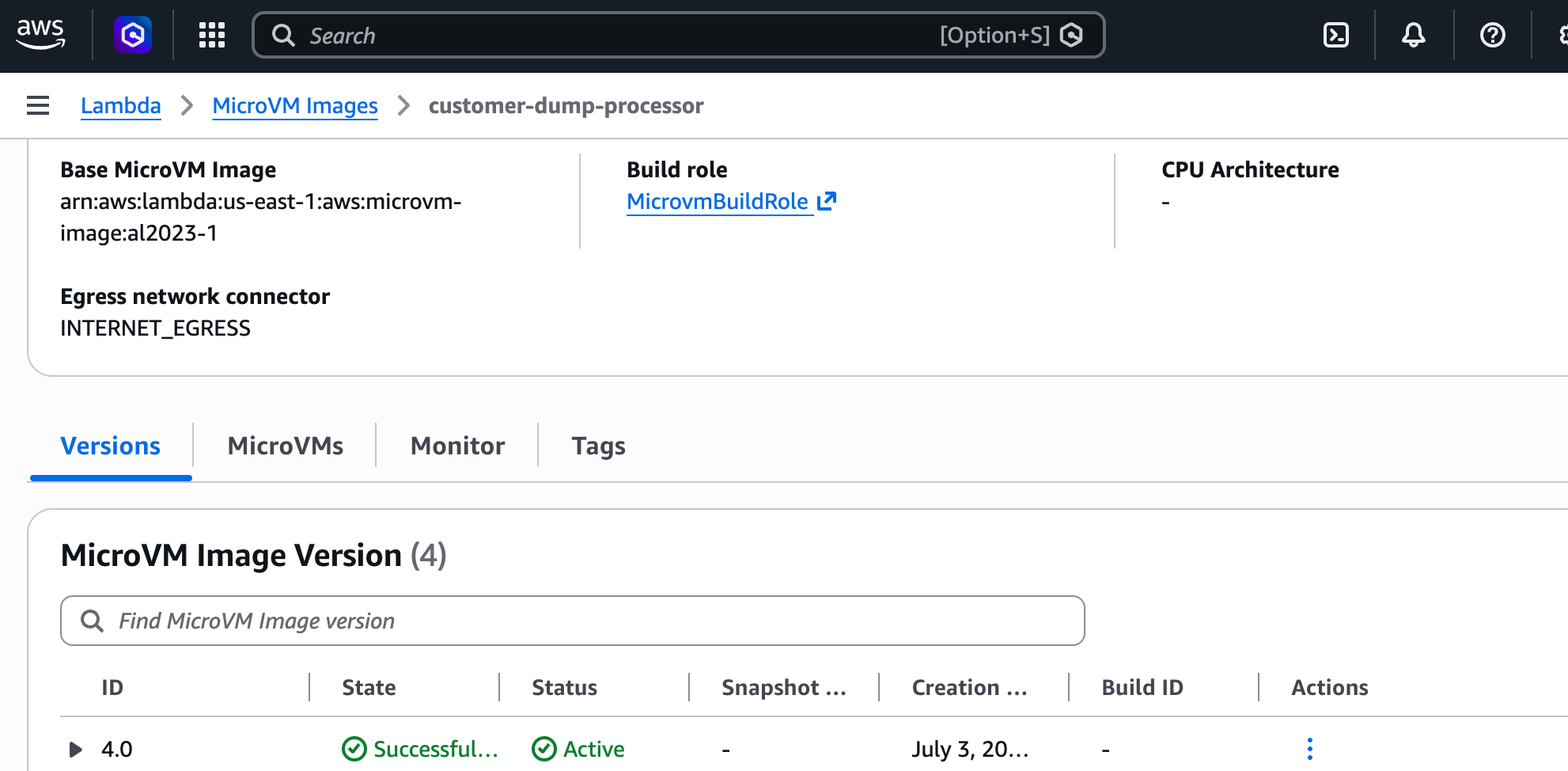
Then, if we do our job right, we have a Lambda MicroVM Image that shows up in the console or on the CLI. This means step one is done. We have “CREATED” our MicroVM, and it’s ready for next steps (RUNNING, then TRIGGER).
See the below image.
Next, we have a bash script to RUN the MicroVM ... aka get it into RUNNING state. Think of it like starting an EC2 instance. I guess we could, in theory, have something triggering this bash script. Maybe an Airflow DAG at the end of each day looking for a new data dump.
set -euo pipefail
source "$(dirname "${BASH_SOURCE[0]}")/config.sh"

echo ">> Running MicroVM from image: $IMAGE_NAME"
run_json=$(aws_mvm run-microvm \
  --image-identifier "$IMAGE_ARN" \
  --ingress-network-connectors "$INGRESS_CONNECTOR" \
  --egress-network-connectors "$EGRESS_CONNECTOR" \
  --idle-policy '{"autoResumeEnabled":true,"maxIdleDurationSeconds":900,"suspendedDurationSeconds":300}')

MICROVM_ID=$(echo "$run_json" | python3 -c 'import sys,json;print(json.load(sys.stdin)["microvmId"])')
ENDPOINT=$(echo "$run_json" | python3 -c 'import sys,json;print(json.load(sys.stdin)["endpoint"])')

echo ">> microvmId=$MICROVM_ID"
echo ">> endpoint=$ENDPOINT"

while true; do
  state=$(aws_mvm get-microvm --microvm-identifier "$MICROVM_ID" \
    --query 'state' --output text)
  echo "   state=$state"
  [ "$state" = "RUNNING" ] && break
  sleep 5
done

printf 'MICROVM_ID=%s\nENDPOINT=%s\n' "$MICROVM_ID" "$ENDPOINT" > "$ROOT_DIR/.microvm"
echo ">> Running. Saved id/endpoint to .microvm — now run scripts/trigger.sh"
And TRIGGER it. Just because the MicroVM is running doesn’t mean it is doing anything. We would have to have another process, in this case my bash script, or maybe a Lambda Function, or Airflow Call, to the MicroVM endpoint to TRIGGER our code to do a thing.
Whatever that thing is that our code does.
set -euo pipefail
source "$(dirname "${BASH_SOURCE[0]}")/config.sh"

[ -f "$ROOT_DIR/.microvm" ] || { echo "!! run scripts/run_microvm.sh first"; exit 1; }
source "$ROOT_DIR/.microvm"

PREFIX="${1:-hard_dive_dump/2026-07-02/}"

echo ">> Creating auth token for $MICROVM_ID"
token=$(aws_mvm create-microvm-auth-token \
  --microvm-identifier "$MICROVM_ID" \
  --expiration-in-minutes 30 \
  --allowed-ports '[{"allPorts":{}}]' \
  --query 'authToken' --output text)

echo ">> POST https://$ENDPOINT/process  (prefix=$PREFIX)"
curl -sS "https://$ENDPOINT/process" \
  -H "X-aws-proxy-auth: $token" \
  -H "Content-Type: application/json" \
  -d "{\"bucket\":\"confessions-of-a-data-guy\",\"prefix\":\"$PREFIX\"}" | python3 -m json.tool
Remember, your logs available in CloudWatch will only be as good as your app; log often and at important points so you know how your application is doing; otherwise, you will have to jump inside the MicroVM, just like the good ol’ EC2 days.
Ok, this is where I got super annoyed. Yes, my MicroVM runs fine, code and all, but, I have something to say about it all.
I take back what I said.
Ok, no takebacks? Well, I take it all back. I’m no longer excited about MicroVMs; there is nothing Micro or lightweight about them in my opinion. The amount of code and triggers and states and this and that, it’s more flipping complicated than an EC2 box that I can spin up and down much more simply.
Classic.
I’ve been foiled.
So much flipping code. Go browse the below if you want.

I mean, why am I not showing you the end result? Because this is crazy is wh’s what it is. Look at the GitHub repo, all the flipping files and backflips.
Who the crap wants to run data pipelines inside a FastAPI app? All behind an HTTP port? Give me a break.
It seems to me that MicroVMs have some very cool features, but the use cases are a little narrow. This isn’t something that the masses will probably use, at least not in its current form. You really need to have some strange use case, a long-running, but not that long-running (8-hour max) task that needs the benefit of being suspended and restarted? Sure, maybe some AI workflows.
I get they try to sell you on the VM isolation, big deal, whatever.
Yes, once you build a MicroVM image that states it, running it is fast. I found that out by playing around. Sure, it’s nice to have Lambda-style super-fast starts with bigger memory and size limits. But that’s just it. It’s cool but utterly useless.
The whole idea of doing EVERYTHING via HTTP is really dumb, especially since the darn thing runs for 8 hours max and then shuts off. So I need to build an app that handles HTTP routing and communication but is short-lived to do some “Data Science” stuff they were talking about.
I think someone at AWS is smoking something good.
MicroVMs combine the worst things about Lambdas and EC2 instances into a single product.
Yeah, maybe I will regret this hot take; maybe I don’t know what I’m doing, and I missed something completely. That’s totally possible. Leave me a comment.
The worst part of AWS Lambda MicroVMs is that they took away ALL the best parts of Lambdas.
low complexity, concepts, and code requirements
various helpful trigger and firing mechanisms.
If EC2 and Lambda were in high school, made love behind the football stadium, and had a baby out of wedlock, AWS Lambda MicroVMs are that baby. Everyone wants to love it, but it’s a real pain in the !@#$@!.
Sure, maybe I’m just mad that I got it wrong from the start and was excited about something that turned out to be not what I thought. Yeah, that’s probably most of it. But honestly, I just fail to see where this weirdo fits into *most architectures.
Hey you! %20 off paid subscription.
Yeah, I’m looking at you, you little stinker. You made it to the end of the article, eh? Well, good for you. Hey, do you realize I put myself through hell every week, hacking on junk like this, all for you?
Just so you have something to scroll on your phone when you’re bored at work?
Throw a guy a bone or two, you give Amazon your money to drop crap on your doorstep. I love you more than Amazon does.
What? You want to know what you get for your money. Well, you can sleep well at night knowing you’re not a free loader. Also, you get plenty of Member-Only content, access to my Discord channel, where you can listen to all my Podcasts right after recording, and early access to articles like this.